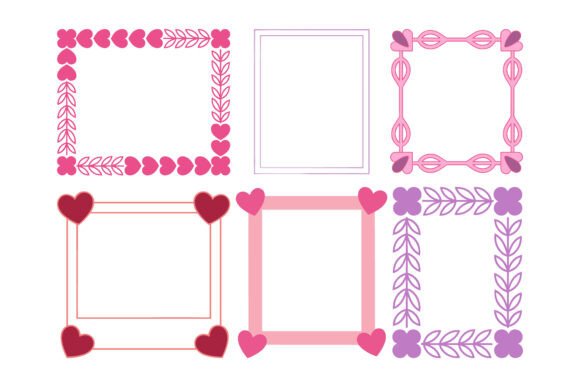
Cute Valentine Decorative Border Frames
Designing for love doesn’t mean sacrificing professionalism—or flexibility. Cute Valentine Decorative Border Frames is a curated set of romantic, clean vector frames built for creators who need visual consistency without creative compromise. These aren’t generic clipart borders; they’re thoughtfully composed square frames featuring interwoven hearts, delicate florals, and soft curves—all rendered in harmonious pink and purple tones. Their flat, minimalist vector style ensures crisp rendering at any scale, whether printed on premium wedding stationery or scaled down for Instagram Stories.
This package fits naturally into multiple phases of a design workflow—not as an afterthought, but as a foundational asset. Before a project begins, it helps define tone and audience alignment: selecting these frames early signals a warm, approachable, and intentionally romantic aesthetic—ideal for brands targeting couples, educators planning classroom valentines, or small businesses launching seasonal promotions. During execution, the frames serve as structural anchors—guiding layout hierarchy, framing photos or text blocks, and reinforcing brand cohesion across touchpoints. After delivery, their reusability supports long-term asset management: one purchase yields consistent styling across future campaigns, saving time and maintaining visual continuity.
How It Integrates Into Real Creative Workflows
Unlike raster-based decorations that degrade when resized or edited, Cute Valentine Decorative Border Frames are delivered as editable vector assets—specifically, 100 individual vector shapes in EPS format. That means designers using Adobe Illustrator, CorelDRAW, or Affinity Designer can ungroup, recolor, resize, rotate, or layer elements without quality loss. The included JPG file serves as a quick preview or fallback for non-vector workflows (e.g., PowerPoint presentations or Canva templates), while the 300 DPI resolution ensures print-ready clarity for physical products like greeting cards or boutique packaging.
For marketers building email campaigns, these frames function as modular design components: wrap a product photo in a heart-embellished border for a limited-time offer, or use a floral frame to highlight customer testimonials during February. Educators preparing classroom materials can insert student names inside editable frames for personalized valentine cards—no design skills required, just drag-and-drop customization. Freelancers delivering branding packages for wedding planners or boutique chocolatiers include these frames as part of a cohesive visual system—paired with matching fonts and color palettes—to reinforce client identity across digital and print collateral.
Practical Implementation Tips for Consistent Results
Start by auditing your current tools and output requirements. If you work primarily in Canva or Google Slides, import the JPG version first to test placement and proportion—then switch to the EPS file in Illustrator if deeper editing is needed. Always save original EPS files separately before modifying; this preserves the ability to regenerate clean versions later. When recoloring, stick to the provided RGB palette unless converting for CMYK print—most desktop printers handle RGB well, but commercial print vendors often require CMYK conversion, which may shift pastel tones slightly.
For efficiency, create a “Valentine Asset Library” folder within your project structure: include the ZIP file, a renamed version of the EPS with your project name (e.g., “BloomCakes_ValentineFrames_v1.eps”), and a simple PDF cheat sheet noting which frame numbers correspond to specific uses (e.g., “Frame #42 = social media post border,” “Frame #78 = invitation corner accent”). This reduces decision fatigue across projects and supports team handoffs.
Consistency matters most when scaling across platforms. Use the same frame variant across Instagram posts, email headers, and printed menus—even if cropped differently—to build subconscious recognition. Avoid overloading layouts: one frame per composition is usually enough. Let it frame a headline, enclose a QR code linking to a reservation page, or subtly outline a product photo—not all three at once. Subtlety reinforces sophistication; clutter dilutes intent.
Compatibility, Quality Control, and Long-Term Use
The package’s technical specs support both immediate usability and future-proofing. RGB color mode ensures accurate on-screen display across devices, while 300 DPI resolution meets industry standards for high-quality printing—including letterpress, foil stamping, and matte cardstock. Because each shape is individually editable, you’re not locked into preset arrangements—you can extract a single heart motif to use as a bullet point, isolate a vine element to extend a border horizontally, or combine two frames to create a custom double-border effect.
Quality control starts with verification: open the EPS in Illustrator and confirm all strokes are outlined and no embedded raster images remain. Check for stray anchor points or overlapping paths that could cause rendering issues in older software versions. If sharing files with clients or collaborators, export a PDF version of your final edited frame for universal viewing—and retain the editable EPS for future revisions.
Long-term value increases when treated as a reusable system rather than a one-off decoration. Revisit the collection quarterly: adapt frames for other occasions by swapping colors (e.g., mint and peach for spring, navy and gold for anniversaries) or combining motifs with seasonal icons (butterflies for spring, snowflakes for winter). Because the shapes are fully editable, they evolve with your brand—not against it.
Use Cases Across Roles and Industries
Small business owners use these frames to unify seasonal promotions—adding a subtle border to online store banners, packaging inserts, and loyalty program cards. The ability to change colors means one set supports multiple campaigns without repurchasing assets.
Bloggers and content creators embed frames in Pinterest pins or blog headers to signal themed content—“Valentine Recipes” or “Romantic Getaway Guides”—without needing custom illustrations each time. The square format aligns cleanly with platform-native aspect ratios.
Scrapbookers and hobbyists appreciate the precision: print individual frames on sticker paper, cut them out with precision scissors or a cutting machine, and layer them physically over photos or journal pages. The soft color palette avoids clashing with vintage or neutral paper stocks.
Educators integrate frames into printable worksheets, classroom door decorations, or digital learning modules. Since the files are royalty-free for personal and commercial use, teachers can share them with students for collaborative projects—no licensing concerns.
Ultimately, Cute Valentine Decorative Border Frames works because it respects process. It doesn’t ask you to overhaul your tools or learn new software—it slots into what you already do, enhancing clarity, speeding up iteration, and supporting intentional design decisions. Whether you’re finalizing a wedding invitation suite or drafting a social media calendar for February, having these frames ready means less time searching, more time creating—and consistently thoughtful results.