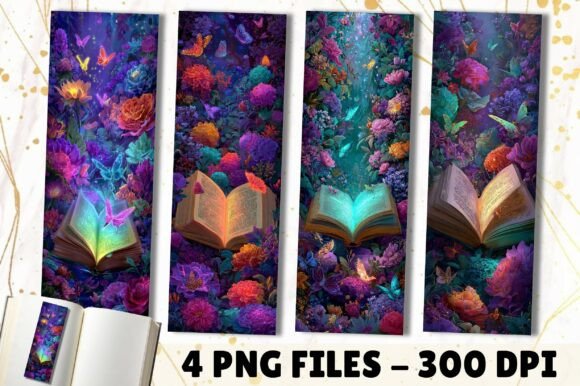
Glowing Neon Magic Garden Book Bookmark
Bookmarks are more than placeholders—they’re quiet conductors of attention, intention, and identity. The Glowing Neon Magic Garden Book Bookmark is designed for people who treat reading, creating, and sharing as intentional acts—not passive habits. It’s a digital asset built for precision: four high-resolution PNG files (2″ × 6″, 600 px × 1800 px at 300 DPI), optimized for both print fidelity and screen clarity. That resolution isn’t arbitrary—it ensures crisp edges on physical prints and pixel-perfect rendering in digital layouts, whether embedded in an eBook, pinned to a Pinterest board, or layered into a Canva invitation.
Where This Fits Into Your Real-World Workflow
This isn’t a decorative afterthought. It’s a functional element that slots into multiple stages of a project—before launch, during execution, and long after delivery. Consider how it functions across contexts:
- Before publishing: Use one bookmark as a visual placeholder while drafting a book proposal or marketing assets. Its vibrant neon-garden aesthetic signals tone and audience alignment before a single chapter is finalized.
- During promotion: Embed a bookmark in your author newsletter as a “thank you” download—no shipping, no inventory, just immediate value that reinforces brand cohesion.
- After release: Bundle it with a PDF reader guide or course workbook. Readers retain a tactile reminder of your content long after they’ve scrolled past your social post.
Unlike generic clipart, these bookmarks carry consistent visual language: glowing accents, botanical motifs, and balanced negative space. That consistency matters when you’re building recognition across platforms—your Instagram story, your Etsy listing, and your printed event handout all feel like parts of the same ecosystem.
Integration With Tools You Already Use
The Glowing Neon Magic Garden Book Bookmark works because it doesn’t demand new software or learning curves. It’s compatible with everyday tools:
- Canva: Upload directly and resize without quality loss—ideal for customizing giveaway bundles or embedding into digital welcome kits.
- Adobe Express or Photoshop: Layer over textured backgrounds or add subtle drop shadows for premium print mockups.
- Mailchimp or Substack: Attach as a downloadable incentive in automated welcome sequences—no coding required.
- Print-on-demand services: Drop the 300 DPI files straight into Printful or Gelato product templates for physical bookmarks, gift cards, or mini-posters.
No conversion steps. No upscaling warnings. Because each file is native 600 × 1800 px at true 300 DPI, you avoid the softness or jagged edges common with resized web graphics. That technical reliability saves time in quality control—especially when prepping assets for client deliverables or batch-printed event materials.
Practical Uses Beyond the Obvious
Yes, it marks pages. But its real utility emerges in cross-functional applications—many of which require zero extra design work:
- For educators: Print one per student as a “reading milestone” reward—pair with a short reflection prompt (“What surprised you on this page?”) to deepen engagement.
- For small business owners: Insert into subscription boxes alongside handwritten notes. The neon glow catches light on shelves or in unboxing videos—subtly reinforcing brand energy.
- For content creators: Animate one bookmark in CapCut or DaVinci Resolve as a seamless transition between video chapters—no need for complex motion graphics.
- For publishers: Use as a consistent visual anchor across series branding—swap only the color accent while keeping layout and motif intact.
Each use case leverages the same core strengths: legibility at small scale, adaptability across formats, and emotional resonance without cliché. The garden motif suggests growth and care; the neon glow implies modernity and vibrancy—not flashiness for its own sake, but visibility where it counts.
Preparing, Organizing, and Scaling Your Use
To get consistent results, start with organization—not inspiration. Create a dedicated folder labeled “Glowing Neon Magic Garden Book Bookmark” and store all four files there, named clearly (e.g., “GNMG-Bookmark-Teal.png”). Add a README.txt with notes on ideal use cases and compatible color palettes if you plan to overlay text.
If you’re using these across multiple projects, consider adding a lightweight naming convention to derivatives: “GNMG-Bookmark-Teal-Newsletter-V1.png”. Versioning prevents confusion when iterating for different audiences (e.g., a muted variant for corporate training vs. the full neon version for creative workshops).
For long-term use, test print one bookmark on your preferred paper stock first—especially if ordering bulk batches. Matte vs. glossy finishes interact differently with neon tones. A quick 3×5 test print reveals how saturation holds up and whether you’ll want to adjust brightness in your editing tool before final export.
Quality Control and Consistency Checks
Because these are digital files—not physical goods—you retain full control over output quality. But that also means responsibility lies with you to verify before distribution:
- Open each PNG in a basic viewer (Preview on Mac, Photos on Windows) and zoom to 200%. Confirm no pixelation or unintended transparency around edges.
- Drag one into a blank Word or Google Doc set to 2″ × 6″ page size. Check margins and alignment—if text overlays are planned, ensure safe zones exist.
- Upload to your email service provider’s asset library and preview on mobile. Does the glow remain distinct against light backgrounds? If not, add a 1-pixel white stroke in editing software before re-uploading.
These checks take under five minutes but prevent misfires—like a faded bookmark in a high-stakes client presentation or a clipped edge in a printed favor bag. Consistency here builds trust: readers, buyers, and collaborators begin to associate that precise neon-green stem or lavender bloom with reliability.
Making It Part of Your Routine
Don’t wait for a “big project” to use the Glowing Neon Magic Garden Book Bookmark. Build it into micro-habits:
- Add one to every PDF resource you share—even internal team docs. It quietly elevates perceived value.
- Keep a bookmark file open in your design workspace while building landing pages. Its proportions serve as a live reference for vertical composition.
- When planning a launch calendar, assign one bookmark per phase (e.g., “Pre-Launch Teal”, “Launch Day Magenta”)—a visual cue that reinforces timing and tone.
Over time, it stops being an “asset” and becomes infrastructure—like a well-organized font library or a trusted color palette. You reach for it not because it’s trendy, but because it solves specific, recurring problems: marking progress, signaling intention, and connecting meaningfully—with minimal friction.
This is digital utility with intention. No physical inventory. No lead times. Just four files, ready to support your process—whether you’re guiding a reader through a novel, guiding a team through a strategy session, or guiding yourself through a season of focused creation.