Woodland Creatures Vol 1: A Thoughtful Resource for Nature-Inspired Creative Work
Woodland Creatures Vol 1 isn’t just a collection of images—it’s a tactile, atmospheric tool designed to support intentional creative work. It meets creators where they are: in the quiet space between planning and execution, between observation and expression. Whether you’re assembling a journal page, designing a seasonal product label, or building a brand identity rooted in calm authenticity, this set functions as both anchor and catalyst. Its strength lies not in visual intensity but in its consistency—warm tonal harmony, restrained detail, and compositional stillness that invites focus rather than distraction.
How Woodland Creatures Vol 1 Fits Into Your Workflow
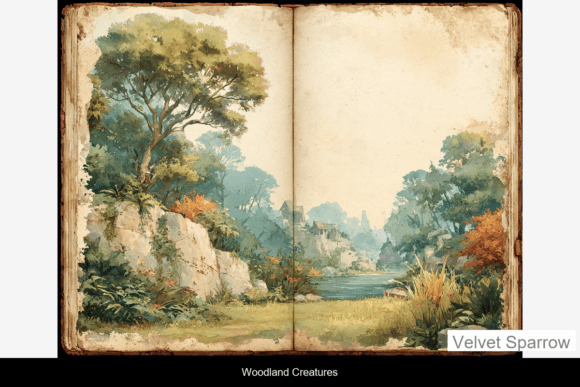
This resource integrates most effectively when aligned with phases where tone, texture, and emotional resonance matter more than flash or novelty. For example, during the concept development stage of a nature-themed journal line, designers often begin with mood boards. Woodland Creatures Vol 1 serves as reliable source material—not as clipart, but as reference-grade visual language. The eight high-resolution JPGs offer variation without dissonance: a fox curled beneath ferns, a deer paused mid-step, a hedgehog half-hidden in leaf litter. Each image carries the same quiet narrative logic, making them interoperable across layouts without requiring heavy editing or color correction.
During execution, the included print-ready PDF and EPS file become especially valuable. The PDF ensures crisp output for physical journals or printed workshop handouts—no pixelation, no scaling guesswork. The EPS file supports vector-based workflows in Adobe Illustrator or Affinity Designer, allowing for precise resizing, layer isolation (e.g., extracting just the branch silhouette), or integration into scalable brand assets like letterpress stationery or embroidery patterns. Unlike generic stock imagery, these files were built for reuse: clean edges, balanced negative space, and intentional cropping that respects natural proportions.
Practical Integration Across Common Use Cases
Junk journaling and nature-themed journals: Because the images feel grounded—not whimsical, not cartoonish—they pair well with handwritten reflections, pressed botanicals, or typewritten quotes about stillness and attention. Try printing one image at 4×6” on textured paper, then stitching it into a handmade journal spread alongside a short paragraph about a recent walk. The warmth of the palette complements kraft paper, linen covers, and muted ink colors without competing.
Scrapbooking and keepsake pages: When documenting personal milestones—a child’s first forest hike, a garden’s seasonal shift—Woodland Creatures Vol 1 adds subtle storytelling depth. Rather than placing an animal front-and-center, use it as background texture: scale down a JPG to 15%, layer it beneath vellum or tracing paper, and overlay handwritten notes. This preserves legibility while reinforcing theme through atmosphere.
Mixed media and collage: The resolution and file variety make these assets adaptable to analog-digital hybrid processes. Print a JPG on watercolor paper, then paint over it with diluted gouache to soften edges. Or import the EPS into Procreate, isolate the creature using selection tools, and place it against a hand-scanned bark texture. Compatibility isn’t assumed—it’s built in.
Preparation Matters: Getting Started Efficiently
Before opening any file, consider your output goal. Are you building digital templates for clients? Prioritize the EPS for scalability. Preparing printed journal kits? Use the PDF for consistent bleed and crop marks. Creating layered digital collages? Start with the JPGs—they load faster and render reliably in Canva, Photoshop, or Affinity Photo.
Organize the files thoughtfully from day one. Rename each JPG with a descriptive label (e.g., “woodland-creatures-fox-under-ferns.jpg”) rather than generic numbering. Store them in a dedicated folder nested within your broader “Textures & Assets” directory—not buried in downloads or scattered across cloud folders. This small step saves time when sourcing assets mid-project, especially during tight deadlines or collaborative work.
Compatibility and Real-World Constraints
These files work cleanly within common creative ecosystems—but only if expectations align with their design intent. They aren’t optimized for social media banners (no bold contrast or central focal points) nor for large-format signage (the detail richness doesn’t scale infinitely). Instead, they thrive in intimate formats: 5×7” journal spreads, A5 planner inserts, 8×10” framed prints, or 4×6” greeting cards.
If you use Notion, Airtable, or Trello for project tracking, consider adding a “Visual Assets” column where you link directly to the folder containing Woodland Creatures Vol 1. Tag entries with context: “Used in Spring Journal Kit V2,” “Paired with Wildflower Watercolor Set.” Over time, this builds traceability—helping you assess which assets deliver the strongest emotional response from your audience or align best with specific themes.
Long-Term Usability and Quality Control
Because the aesthetic is intentionally nostalgic yet not dated, Woodland Creatures Vol 1 avoids trend dependency. You won’t need to replace it seasonally. That said, long-term value depends on how consistently you apply it. Reuse the same fox image across three different journal themes? It risks feeling repetitive. But rotate across the full set—using the badger for autumnal layouts, the owl for moonlit reflections, the squirrel for playful curiosity—and the collection gains cumulative strength.
For educators or workshop facilitators, these images serve double duty: as visual prompts and as teaching tools for composition and mood. Ask participants to describe what time of day each scene suggests, or what sound might accompany the image. This deepens engagement beyond decoration—turning asset use into reflective practice.
Workflow Examples You Can Adapt Today
- For freelancers building client proposals: Embed one Woodland Creatures Vol 1 image as a subtle header background in a PDF proposal for a wellness brand. Pair it with clean sans-serif type and ample white space. The result feels grounded—not sterile, not cluttered.
- For small business owners launching seasonal products: Use the EPS file to extract a single branch element, convert it to a custom divider line in packaging design software, and repeat it along the edge of a tea box label. It ties the physical product to the broader brand world without needing illustration from scratch.
- For bloggers documenting creative routines: Capture a photo of your desk setup—notebook, pen, cup of tea—then overlay a low-opacity Woodland Creatures Vol 1 image (e.g., the hedgehog among leaves) in post-processing. It signals theme without overshadowing the real-life moment.
The quiet presence of Woodland Creatures Vol 1 works best when treated as part of a larger system—not as a standalone flourish, but as one calibrated element among many. It supports clarity by reducing visual noise. It supports reflection by honoring slowness. And it supports consistency by offering cohesion across formats, platforms, and projects—without demanding uniformity.
When used deliberately, it becomes less about what the images depict and more about what they allow: space to breathe, permission to pause, and a gentle reminder that meaningful detail often lives just off the main path.