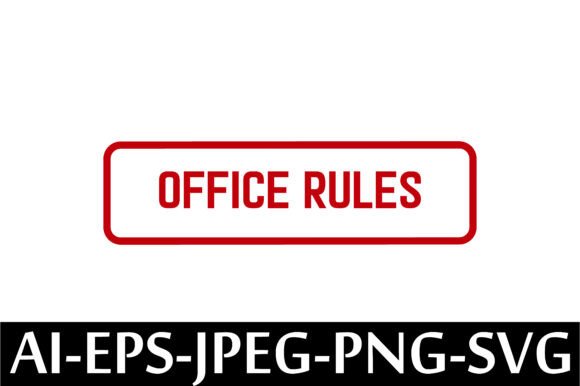
OFFICE RULES Rubber Stamp Design Vector
If you've ever wanted to add a touch of playful authority—or just a little organized charm—to your workspace, the OFFICE RULES Rubber Stamp Design Vector is a smart, flexible tool for doing exactly that. It’s not a physical stamp you hold in your hand. Instead, it’s a ready-to-use digital file set designed for creators who want to print, cut, engrave, or embed a clean, professional “Office Rules” motif into their projects—without starting from scratch.
What You’re Actually Getting (and Why It Matters)
This listing delivers five high-quality, editable files—all packed into one zip folder: an AI (Adobe Illustrator) file for full vector editing, an EPS version for broad compatibility with design software, a crisp JPEG for quick previews or web use, a transparent-background PNG for overlays and digital presentations, and an SVG file ideal for cutting machines like Cricut or Silhouette.
Because it’s a vector-based design, you can scale it up to poster size or down to a tiny label—no pixelation, no quality loss. That flexibility makes it useful whether you're designing a laminated desk sign for your team or prepping a branded sticker sheet for resale.
Who Benefits—and How
Small business owners often use this kind of design to reinforce workplace culture—think: a friendly but firm reminder on welcome packets, internal memos, or training binders. Freelancers and remote workers might print it onto notebooks or wall art to define personal boundaries (“No emails after 6 p.m.”) in a lighthearted way.
Educators find value in adapting the layout for classroom rules posters—swapping out text or adding icons while keeping the bold, readable structure. Bloggers and content creators use the PNG or SVG versions to watermark printable planners, PDF checklists, or social media graphics with a consistent visual theme.
And yes—it’s fully commercial use licensed. That means if you make custom mugs, tote bags, or acrylic desk organizers featuring this design, you’re free to sell them. No extra permissions needed. Just keep in mind that you’re licensing the *design files*, not trademark rights to the phrase “Office Rules” itself.
Real-Life Uses That Fit Naturally
- Print & Go Signage: Print on cardstock, laminate, and mount near shared printers or break rooms to gently highlight expectations—like “Please refill the coffee” or “Sign in at the front desk.”
- Custom Packaging: Add the stamp graphic to shipping labels, thank-you cards, or product inserts for small-batch goods—giving your brand a cohesive, slightly witty tone.
- Digital Templates: Drop the SVG into Canva or Google Slides to create consistent slide headers for team onboarding decks or workshop handouts.
- Craft Projects: Use the vector files with vinyl cutters or laser engravers to make wooden coasters, metal bookmarks, or fabric patches—ideal for office-themed gift sets.
- Internal Communications: Insert the PNG into email footers or Slack announcements to visually anchor recurring reminders—“All meeting invites must include agendas.”
A Few Practical Things to Keep in Mind
Since this is an instant-download digital product, there’s no waiting for shipping—but it does mean you’ll need basic tools to open and use the files. Make sure your device has unzipping software installed (most modern operating systems do this by default). If you plan to edit the AI or EPS files, you’ll need compatible software—Illustrator works best, though Affinity Designer and Inkscape can handle EPS and SVG well.
The JPEG and PNG are great for quick use, but they’re raster files—so avoid stretching them beyond their original dimensions if you need sharp detail. For anything involving resizing, cutting, or professional printing, stick with the AI, EPS, or SVG versions.
You won’t receive a physical rubber stamp, nor instructions for carving one. This is purely a design resource—not a finished craft kit. That’s actually a benefit: it gives you full control over how and where the design appears, without being limited by material, size, or ink type.
Why This Stands Out Among Similar Downloads
Not all “office rules” graphics are created equal. Some are low-res, overly cluttered, or locked into rigid fonts that can’t be edited. This OFFICE RULES Rubber Stamp Design Vector balances clarity and personality: bold outlines, balanced spacing, and a clean sans-serif style that reads well at any size—even on mobile screens or small printed tags.
It’s also intentionally versatile. The layout leaves room for customization: you can easily add your company name, adjust bullet points, or pair it with complementary icons (like coffee cups, clocks, or checkmarks) using the same vector workflow.
For beginners, the inclusion of multiple file types removes guesswork. Not sure which format to use? Start with the PNG for simple drag-and-drop tasks, then explore the SVG if you get a cutting machine later—or jump straight into the AI file if you’re already comfortable with vector editing.
Getting Started Is Simple
After purchase, your download link appears instantly—no waiting, no login hoops. Once unzipped, open the folder and scan the filenames. Each is clearly labeled (e.g., “office-rules-stamp.ai”), so you can match the right file to your project needs without digging through layers or hidden folders.
No subscriptions. No watermarks. No monthly fees. Just one straightforward purchase, five usable files, and the freedom to adapt the design across both digital and physical outputs—on your timeline, with your goals in mind.
If you value consistency, efficiency, and a dash of personality in how you communicate rules, routines, or expectations—whether in your home office, classroom, studio, or small shop—this OFFICE RULES Rubber Stamp Design Vector is a quietly powerful addition to your creative toolkit.